

From first photo to final estimate Without the disconnect
With JobSight and Xactimate® working together, your field data flows straight into your estimate. No rework, no delays.
Just faster cycle times and more confident numbers.
Made by industry experts for industry experts. JobSight allows teams to
handle more jobs & increase job margins
Get Started with JobSight x Verisk™
One workflow. Field to file, without the friction.
By connecting JobSight and XactAnalysis®, job claim data, photos, notes, and other relevant assignment details sync effortlessly. And with no double entry, no data mismatch. Just a simpler path from initial assignment and documentation to a closed claim.
Benefits and Key Features:
A connected workflow increases efficiency:
Pull XactAnalysis assignments and claim data to eliminate double entry
Send complete Xactimate estimates with line item details and sketches into JobSight
Push notes, photos, and documents to XactAnalysis effortlessly
What you need to get started
An Active JobSight Account
An XactNet® Address
An Xactimate license
*Admin Permissions required*
Set up your JobSight + Verisk integration
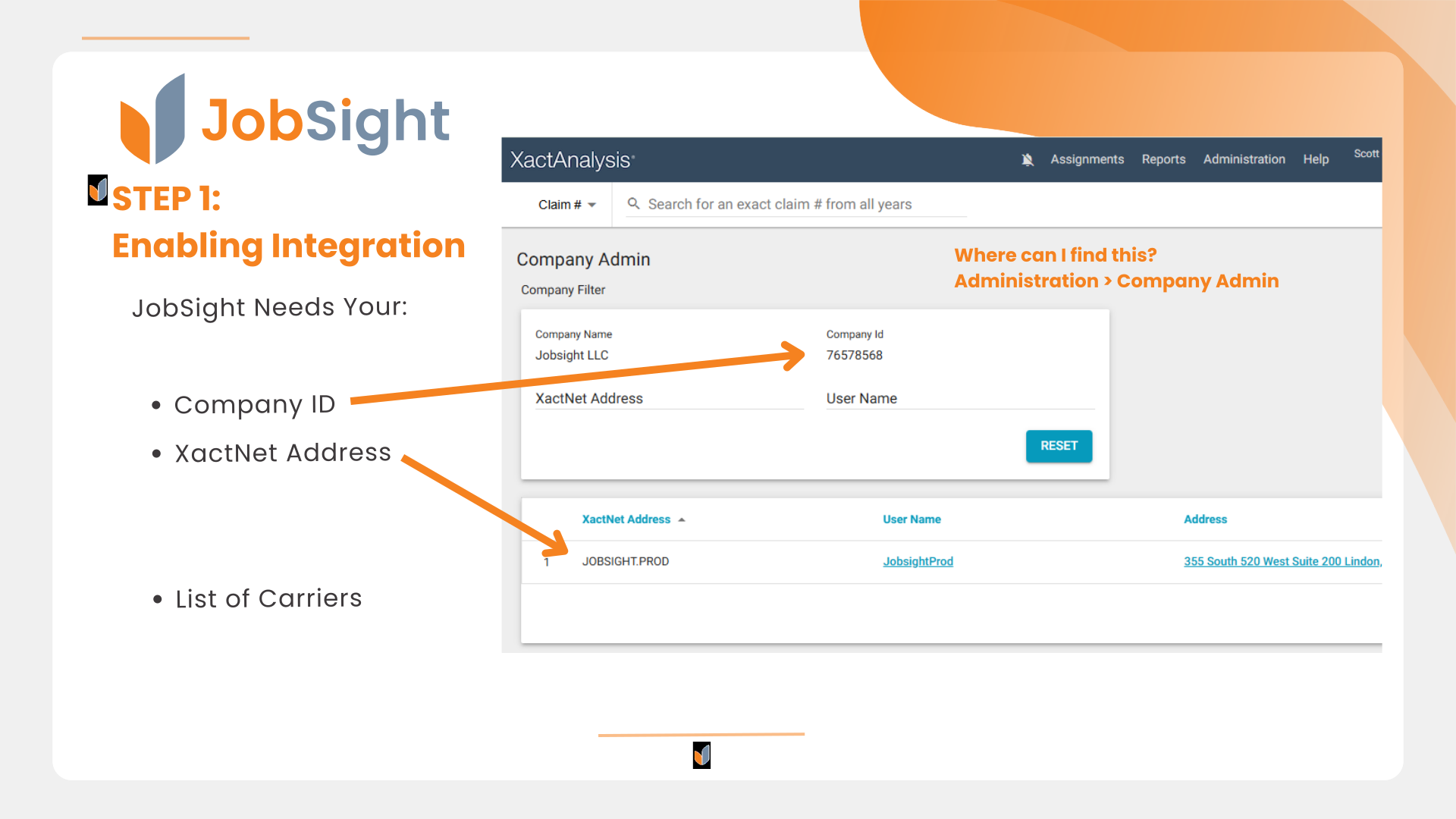
Step 1: Share XactAnalysis Details
Find your Company ID
Find your XactNet Address
Send these details to your JobSight contact
The integration will be enabled within your JobSight account
Step 2: Prepare Carrier Auth Forms
If you participate in TPA programs and receive assignments, you will need to receive a signed carrier authorization form in order to receive assignments from XactAnalysis.
Compile a list of all TPA Programs from whom you receive assignments and share this list with your JobSight contact
JobSight will prepare the official forms for you
You will send a prepared form to each TPA that you work with
Once the carrier auths are signed and returned to you, send them to your JobSight contact
JobSight will submit the carrier auths to Verisk
Step 3: XactAnalysis Company Setup & Exports
Currently Enabled Exports: Under JobSight, change the Export Type to "Automatic."
Accepting Assignments from XactAnalysis
The following video outlines how to accept assignments from XactAnalysis within JobSight.
Sending JobSight notes, photos, and documents to XactAnalysis
The following video outlines how to send job notes, photos, and documents from JobSight up to XactAnalysis for full documentation.
Receiving Xactimate estimates in JobSight
The following video outlines how to send an Xactimate estimate to JobSight, with all line item details and sketch included.
Syncing Jobs from JobSight to Xactimate
The following video outlines how to originate a job in JobSight and sync to create a project in Xactimate.
Support Contact info
Have questions or need assistance?